
If you need an online classroom with an interactive whiteboard, group activities, and many tools to support teachers during a session, ClassIn is worth considering. If you need to build a training program with learning materials, quizzes, progress tracking, and reporting on a customizable system, Moodle is usually the better fit.
That is the short answer to “ClassIn or Moodle?”. However, many schools and training centers need both: a platform to manage the learning journey and a tool to run live classes. In that case, combining the two systems is also an option worth evaluating.
This article compares ClassIn and Moodle based on real-world use to help you choose the platform that fits your goals, operations team, and budget.
How do ClassIn and Moodle differ?
ClassIn focuses heavily on the live teaching experience. The platform provides an interactive whiteboard, in-class activity tools, breakout rooms, document sharing, and class management features. ClassIn also includes assignments, quizzes, and learning data, so it shouldn't be seen as just a video calling app. Specific features depend on the plan. See ClassIn features and plans.
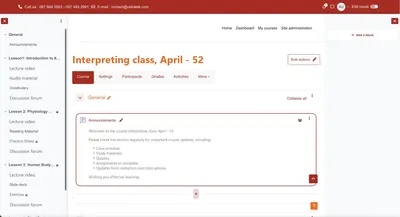
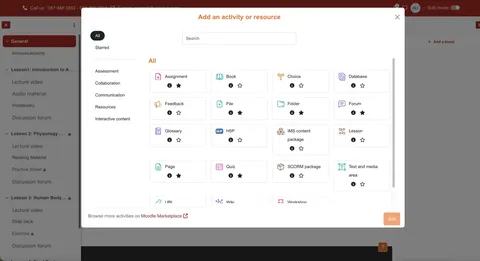
Moodle is an open-source learning management system (LMS). Organizations can create courses, distribute learning materials, run assessments, manage grades, and track learner progress. Moodle's interface can be customized, extended with plugins, and connected to other tools. See Moodle LMS features.
The most important difference lies in the primary use case: ClassIn shines when live sessions are at the center of the experience; Moodle delivers value when an organization needs to manage the entire learning process before, during, and after each session.
Comparing ClassIn and Moodle by deployment needs
- Live classroom interaction: ClassIn comes with many tools designed for teachers and students to interact during a session. Moodle can also run live classes through tools such as BigBlueButton, with a whiteboard, screen sharing, and breakout rooms; the experience depends on the configuration and the web conferencing service chosen. Learn about live classes in Moodle.
- Long-term course management: Moodle is a good fit when you need to organize many courses, materials, assignments, grades, and completion in one system. ClassIn also supports course and assignment management, but you should check how well it meets your organization's specific administrative processes.
- Customization and integration: Moodle allows deep customization when the organization self-hosts or uses a suitable implementation service. ClassIn offers integration via LTI and partner options; the scope needs to be confirmed based on the plan and technical requirements. See ClassIn integration documentation.
- Technical operations: With ClassIn, the organization uses the service under the provider's plans. With self-hosted Moodle, the organization must handle infrastructure, updates, backups, and technical support. Moodle is also available with hosting and support from service providers. See Moodle deployment options.
- Cost: ClassIn offers plans with different limits and features. Moodle LMS software can be downloaded and used for free, but a real deployment still incurs infrastructure, configuration, customization, and operating costs. So compare the total cost of ownership rather than just plan prices or license fees.
When should you choose ClassIn?
ClassIn deserves priority if most of a course's value is created during live sessions. For example, a language center running many classes on fixed schedules may need teachers to call students up to the board, split them into discussion groups, use interactive tools, and manage the class while teaching.
ClassIn is also a good candidate for a pilot when the team needs to launch online classes with a ready-made toolset designed for teaching. Before deciding, have teachers and students try a representative session, and check participant limits, session length, recording, reporting, and the limits of the intended plan.
When should you choose Moodle?
Moodle is a good fit when an organization needs a training system that can grow over the long term: many courses, many learner groups, self-paced content, quizzes, grades, and progress reports. This is a common need for businesses running internal training, schools, and providers of blended programs that combine live and self-paced learning.
Moodle is also worth considering if the organization wants to adapt the learning process to how it operates or connect the training system with existing tools. For instance, Moodle supports SCORM content packages and external tools via LTI. The specific integration scope still needs to be assessed, configured, and tested before going live. See the SCORM documentation and Moodle's LTI documentation.
A note on budget: “Open source” does not mean “free to deploy.” If you choose self-hosted Moodle, you still need to budget for servers, security, backups, upgrades, administrator training, and user support.
Can ClassIn be combined with Moodle?
You can evaluate an approach where Moodle manages courses and ClassIn handles live sessions. Moodle supports adding external tools to courses via LTI, and ClassIn also offers LTI integration. This provides a technical basis for exploring a combined setup, but it doesn't mean all data syncs automatically on every plan. See Moodle's LTI documentation and ClassIn.
Before deploying, check at least four things: how learners log in and join class; where the class schedule is created; which attendance, assignment, or result data can move between the two systems; and who is responsible for support when a session runs into problems. A pilot session with a real class will confirm whether this approach works well for teachers and learners.
Five questions to help you choose the right platform
- What is the most important activity? Highly interactive live teaching, or managing the entire training program?
- How do learners learn? Mainly through scheduled classes, self-paced study, or a mix of both?
- What data do managers need to see? Per-session attendance, quiz scores, completion progress, or reports across multiple courses?
- Which tools does the system need to connect to? List the required integrations before choosing a plan or planning customization.
- Who will run the system after launch? Clearly assign responsibility for learning content, accounts, teacher support, backups, and incident handling.
If your answers lean toward the experience within each session, try ClassIn first. If the focus is end-to-end training management and customizability, evaluate Moodle. If both sets of requirements matter, pilot a combined workflow on a small scale before expanding.
Frequently asked questions about ClassIn and Moodle
Can ClassIn completely replace Moodle?
It depends on your requirements. ClassIn has class management, assignments, quizzes, and reporting. However, if your organization needs deeply customized training workflows or integrations, check each requirement against the intended ClassIn plan before deciding.
Can Moodle be used for live online teaching?
Yes. Moodle can use live classroom tools such as BigBlueButton. Performance and related costs depend on the configuration, the service used, and class size.
Is Moodle free?
The open-source Moodle LMS software can be downloaded and used for free. Hosting, deploying, customizing, and operating the system may incur costs.
Should a training center choose ClassIn or Moodle?
Centers that prioritize interaction quality in scheduled classes should try ClassIn. Centers that need to manage many courses, learning materials, and long-term progress should evaluate Moodle. If you need both, explore integration options and test the workflow in practice.
How does Vidratek help you choose and implement Moodle LMS?
The right platform needs to support the day-to-day work of teachers, learners, and administrators. That's why, before implementing an LMS, Vidratek works with the organization to clarify training goals, course structure, assessment methods, the data to track, and the systems that need to be connected.
Vidratek provides Moodle LMS implementation services for schools, training centers, and businesses. The scope of work can be defined based on actual needs, from system setup and course structure to customization, integration, and operational support. If your organization already uses ClassIn, the first step is to identify which experiences to keep and which processes to add, before deciding whether to use one platform or combine both. See Vidratek's service overview.
Weighing ClassIn, Moodle, or a combined approach? Share your training scale, class format, and current challenges with Vidratek to receive a tailored implementation proposal. Contact Vidratek.
Back to all posts