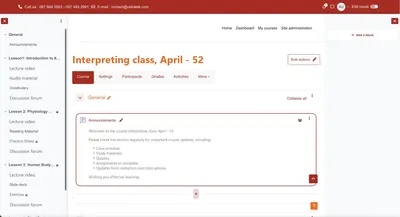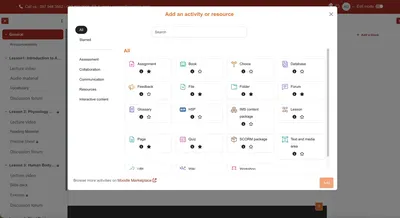


Moodle, Google Classroom and Canvas differ mainly in customization, cost and how hard they are to deploy. Moodle is an open-source LMS with deep customization, suited to organizations with an IT team and diverse training needs. Google Classroom is simple and integrates with Google Workspace, suited to small and mid-sized organizations. Canvas is a commercial LMS with a modern interface and professional technical support, at a higher cost.
Moodle, Google Classroom and Canvas at a glance
| Criteria | Moodle | Google Classroom | Canvas |
|---|---|---|---|
| Platform type | Open-source LMS | Google product, integrated with Google Workspace | Commercial LMS |
| Cost | No license fee, but implementation costs apply | Free, with limited features | Paid, fairly high cost |
| Customization | Very flexible: interface, features, plugins | Limited, within the Google ecosystem | Available to a certain degree |
| Interface | Needs fine-tuning to feel friendlier | Simple and easy to use | Modern and intuitive |
| Deployment and support | Needs an IT team; relies on community and in-house technical staff | Easy to use right away on Google infrastructure | Professional support services |
| Best suited to | Large organizations with diverse needs that want control over technology and cost | Small to mid-sized organizations that need a simple, fast-to-deploy tool | Organizations ready to invest in a professional LMS |
What are the advantages of Moodle over Google Classroom and Canvas?
- Flexible customization: businesses can customize the interface and features and develop plugins for their specific needs. Google Classroom restricts this, and Canvas only supports it to a certain degree.
- Scalability: Moodle copes well as a business grows its training and supports many learning and assessment formats.
- Cost: as an open-source platform, Moodle doesn't require license fees as high as Canvas.
- Large community: an active development community worldwide and in Vietnam makes help easier to find.
What are the disadvantages of Moodle?
- Interface and user experience: compared with Canvas and Google Classroom, Moodle's interface can feel rigid and takes time to customize.
- Requires a technical team: because it is so customizable, Moodle needs a skilled IT team to deploy, maintain and develop it.
- More complex setup: Moodle needs detailed configuration and admin training to run effectively.
How do Moodle and Google Classroom differ?
- Features: Moodle has a full set of tools for course management, assessment and in-depth reporting. Google Classroom prioritizes simplicity and suits small groups or internal training.
- Flexibility: Moodle adapts to each organization, while Google Classroom stays within the Google ecosystem.
- Cost: Google Classroom is free but feature-limited. Moodle has no license fee, but implementation costs can arise.
- Security and control: Moodle gives a business full control over its data and a higher level of security.
How do Moodle and Canvas differ?
- Interface: Canvas is highly rated for intuitive design and a smooth experience. Moodle may need fine-tuning to reach this level.
- Technical support: Canvas offers professional support and frequent updates, while Moodle relies more on the community and in-house technical staff.
- Cost: Canvas is a paid solution with a fairly high cost. Moodle suits businesses that want to control cost and own their solution.
- Features and scalability: both are strong on features, but Moodle stands out for deep customization and its range of plugins.
When should a business choose Moodle, Google Classroom or Canvas?
Choose Moodle if you have diverse, large-scale training needs, a strong IT team and want a flexible platform with full control over technology and cost.
Choose Google Classroom if you need a simple tool, fast deployment and low cost.
Choose Canvas if you are ready to invest in a professional LMS with a modern interface and dedicated technical support.
Choosing the right LMS platform is the foundation for successful training and workforce development.
Frequently asked questions about choosing Moodle, Google Classroom or Canvas
Should a business choose Moodle, Google Classroom or Canvas?
Choose Moodle for deep customization and control, Google Classroom for simplicity and speed, and Canvas for a commercial LMS with professional support.
Is Moodle free?
Moodle is open source, so there is no license fee, but implementation, operation and maintenance still cost money.
Can Google Classroom replace Moodle?
For simple needs inside the Google ecosystem, it can. For deep course management, assessment and reporting that adapts to your organization, Moodle is the better fit.
Does using Moodle require an IT team?
Yes. Because it is highly customizable, Moodle needs skilled IT staff to deploy, maintain and develop it, or a partner that does so.