
An effective internal training system (LMS) needs to do five core things well: manage the right learners, organize content and learning paths by role, assess results, track progress, and deliver useful data to managers. Businesses usually also need permissions, HR system integration, a convenient learning experience and secure operating processes.
Not every business needs every feature from day one. For example, a 50-person company standardizing onboarding will have different priorities from a corporation that needs mandatory training across many units. This article helps you identify the LMS features that matter, know which ones to scrutinize during a demo, and avoid buying a feature-packed system that is hard to use in practice.
Before choosing LMS features, define your training problem
Write down a specific process: who needs to learn, what they need to be able to do, who assigns training, who confirms results and who reviews reports. Without these answers, a long feature list won't tell you which system fits.
For instance, for sales staff onboarding, a business may need to create a new-hire group, assign a product knowledge path, set due dates, check understanding and send progress to team leads. For mandatory training, deadline reminders, keeping proof of completion and controlling who can view data may matter more than a discussion forum.
So evaluate an LMS in three layers: must-have features to run your current process; features that help you scale as the number of learners grows; and advanced features worth investing in only when there is a clear need.
1. Managing learners, groups and access
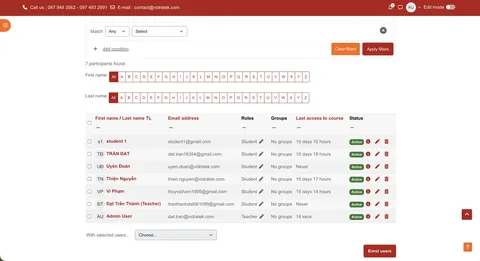
The LMS must let you create or import learners, place them in the right departments or groups, and assign roles to administrators, content creators, line managers and employees. Managers should only see data within their assigned scope.
- Check: when an employee moves to another department, are their view permissions and learning path updated correctly?
- Ask: are accounts created manually, bulk-imported or synced from the HR system? How are departing employees handled?
- Practical value: fewer courses assigned by mistake, and assessment data stays hidden from people who aren't responsible for it.
With multiple branches or units, also check whether you can separate groups, managers and reports by organizational structure. The level of support depends on the product and how it is configured.
2. Creating courses and managing easy-to-update content
The system needs to hold content suited to the work: readings, videos, documents, assignments, live classes or interactive content. Content owners should be able to organize lessons by topic, update versions and reuse content across programs without learners confusing old and new versions.
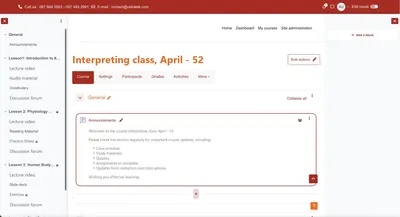
If your business already has content packages or external tools, check which formats and standards you need. Moodle supports activities such as quizzes, H5P, SCORM and external tools via LTI; how well they work depends on the content package, configuration and deployed version. See the list of Moodle activities.
Don't just ask, “Can we upload videos?” Try editing a policy that has changed, find the courses using that policy and confirm learners see the correct version.
3. Learning paths by role and competency goals
A business LMS should help deliver the right content to the right group: new hires, team leads, sales or operations. A path may include multiple courses, a learning sequence, completion conditions and milestones suited to the role.
If your business manages by competency, define the skills to be achieved and what evidence proves an employee has achieved them. Moodle LMS offers competency frameworks and Learning plans; Moodle Workplace adds program allocation and automation designed for corporate training. See Moodle Workplace features.
What to test: create two employees in two different positions and check whether each receives the correct path. A neat course tree that doesn't reach the right people has little operational value.
4. Quizzes, practical assignments and feedback
The LMS should support a range of assessment methods suited to your goals: knowledge-check questions, submissions, practice scenarios or instructor sign-off. Check whether you can set pass criteria, allow retakes when needed and give feedback so employees know what to improve.
For example, after a product lesson, a multiple-choice quiz can check basic facts, while customer consulting skills require simulations or call observation. Test scores and on-the-job competency are two different kinds of evidence. So the system should let managers see both learning results and practical feedback, if your process requires it.
Moodle has assessment activities such as Quiz and Assignment, along with a gradebook to record results. See how Moodle tracks grades and progress.
5. Progress tracking and clear completion criteria
Learners need to know what they still have to do; managers need to know who hasn't started, who is behind, who has submitted and who has completed the course. More importantly, the system must let you define what counts as completion: just viewing the material, reaching a minimum score, submitting work or being signed off by an instructor.
Moodle distinguishes between activity completion and course completion tracking; the related reports are only meaningful when completion conditions are configured correctly. See the progress tracking documentation and the course completion report.
During the demo, have a learner complete the first lesson but fail the final quiz. The report should not show them as passing the whole program just because they opened every page.
6. Reports that support HR and management decisions
Good reports answer specific questions: which groups haven't finished onboarding, which content has a high failure rate, who needs help before the training deadline, and are employees improving after practice? Check whether you can filter by time, role, department and course; export data when needed; and restrict who can view each report.
Moodle LMS has course-level reports and Custom reports to create, share and schedule certain reports based on supported data sources. Moodle Workplace adds reporting tied to programs and organizational structure. The actual reporting scope should be checked against the version, access permissions and configured data.
Don't measure training effectiveness by logins or completion rates alone. Combine learning data with practical assignments and relevant job metrics to see whether the program solves the original problem. Our article on how internal training systems support HR management covers these metrics in more detail.
7. Deadline reminders and mandatory training management
If your business has courses that must be completed by a certain date, the LMS should help assign training, send notifications, flag overdue cases and keep proof of completion. For programs that require periodic retraining, ask how the system manages the next attempt and certification validity.
This is where products are easily confused. Moodle Workplace offers features for mandatory training programs, automation rules and recurring certifications; don't assume those flows are available in exactly the same form in a standard Moodle LMS. See Workplace feature details.
Ask the vendor to simulate a real scenario: an employee misses the deadline, the manager is notified, the employee completes late and the report still keeps an accurate history.
8. Integration with HRM, sign-in and existing learning tools
An LMS rarely stands alone. A business may need to sync the employee list from HRM, sign in with company accounts, run online classes or send completion data to a reporting system. Define the data direction, update frequency, required fields and who handles sync errors.
Moodle has web services that let other systems perform configured operations; this provides a technical foundation for integration but doesn't guarantee every pair of systems can connect out of the box. SSO, HRM or meeting tools also need testing in your specific environment.
Before rollout, agree on a single employee identifier, a primary data source and rules for when employees change positions or leave. To go deeper, see Vidratek's article on Moodle and CRM, ERP, HRM integration.
9. Easy to learn on real devices and safe to operate
Employees must be able to find lessons, read content, complete assignments and see feedback on the devices they normally use. Try a real course on both phone and computer, especially if your team works in shifts or across multiple locations. For content needed on weak connections, test offline access specifically; not every activity supports it the same way. See Moodle's guide to creating mobile-friendly courses.
On the operations side, check permissions, backups, updates, user support and personal data handling. Ask practical questions: who can export grades for an entire department, who approves new content, how are backup restores tested, and who do you contact when the system goes down?
A powerful feature only helps when employees can use it and the admin team can maintain it after launch.
Which features should you prioritize first?
Initial phase: learner management and basic permissions; course creation; group-based assignment; quizzes; completion conditions; progress reports; a good experience on employees' main devices. These are enough to pilot a process such as onboarding.
When scaling: multi-step paths, competency frameworks, manager-level reports, HRM sync, automated deadline reminders and a content update process. Add them only when there is an owner and the input data is reliable enough.
For advanced needs: recurring certifications, multiple units needing their own admin spaces, complex integrations or advanced analytics. Factor in configuration, content, operations and support costs rather than comparing software prices alone.
This order is a suggestion. If mandatory training is the reason for buying an LMS, deadline reminders and proof of completion belong in the initial phase.
How do you test an LMS with a demo script before you decide?
Instead of watching a generic presentation, give the vendor a scenario with sample data and ask them to run it live on the system:
- Import five employees from two departments, assign two different paths and designate the corresponding managers.
- Create a course with materials, a quiz and pass criteria; edit one document to see how updates work.
- Have one person complete it, one fail the quiz and one not start.
- Open reports as an employee, a team lead and HR to check what data each person sees.
- Simulate a department transfer, an overdue course and exporting the data needed for internal reporting.
Record which steps work right away and which need configuration, extra development or a different plan. This gives you a clear basis for comparing solutions and scoping the implementation.
FAQs about LMS features for businesses
Does an LMS need HRM integration from the start?
Not necessarily. For a small pilot group, a controlled list import may be enough. As headcount and staffing changes grow, integration becomes worth evaluating to reduce repetitive work and data discrepancies.
Does an LMS need to support SCORM?
Yes, if your business already has SCORM content or your content provider requires it. If you mainly use readings, videos and quizzes created directly in the LMS, check your actual needs before treating this as a deciding criterion.
Can completion reports measure employee competency?
Not on their own. Completion shows an employee has met the configured learning conditions; competency also requires practical assignments, assessment criteria and on-the-job confirmation.
Does Moodle LMS have all the features of Moodle Workplace?
No. Workplace has additional features designed for organizations. Check each requirement against the specific version and deployment option before signing a contract.
Vidratek helps you choose and implement an LMS that fits your real needs
Vidratek helps businesses implement Moodle LMS to manage courses, learners, assessments, reports and training processes. The first step is to agree on a specific problem, such as onboarding, role-based training or tracking mandatory programs; then define the must-have features, the data to connect and how to measure results. Learn about Vidratek's LMS services.
Drawing up requirements for an internal training system? Share your number of learners, current process and the three things the system must do in the initial phase. Vidratek can work with you to build a test script and propose a suitable implementation scope. Contact Vidratek.
Back to all posts