
An internal training system helps businesses manage people more effectively by standardizing learning, assigning programs by role and showing managers who has completed training, which skills are missing and where support is needed. When training data is well organized, new hires get a clear onboarding path; existing employees get opportunities to grow in their roles; and HR spends less time compiling progress from multiple spreadsheets.
However, completing a course doesn't mean someone is proficient at the job. Businesses still need to assess competency through practical assignments, manager feedback and job performance. This article explains how an internal training system supports each stage of people management, how to measure its effectiveness and where to start.
What is an internal training system? How is it different from HRM?
An internal training system is where a business organizes learning materials, courses, quizzes, learning paths and progress data for employees. A learning management system (LMS) is a common way to implement it. Employees can learn on a schedule or at their own pace; program owners can assign content, track completion and adjust programs.
HRM typically manages employee records and processes such as organizational structure, timekeeping or performance reviews, depending on each system's design. An LMS focuses on learning and capability development. The two systems can complement each other: HRM provides role, department and employee status information; the LMS records learning, assessments and progress. The specific sync scope should be defined and tested during implementation.
According to SHRM's guide to learning and development, employee training spans onboarding, job-required training and long-term development; learning data needs to be tied to business goals to be valuable for management.
How does an internal training system support people management?
- Standardized onboarding: new hires follow the same path covering the processes, tools, product knowledge and practical exercises their position requires. Managers know what has been completed so they can step in at the right time.
- Role-based assignments: sales, customer service and team managers can receive different content instead of all working through one long, loosely relevant course list.
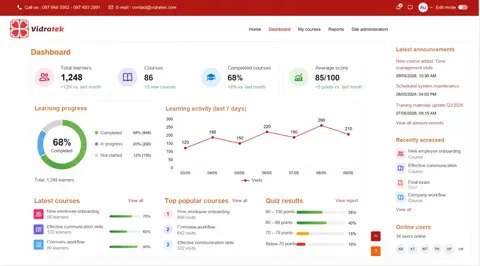
- Centralized progress tracking: HR and managers can see learning status, assessment results and cases that need a reminder or support, if access permissions are configured appropriately.
- Identifying skill gaps: when a business defines the skills each role needs, learning and assessment results help raise questions about missing skills. Development decisions still require on-the-job observation and direct conversations.
- Consistent knowledge updates: a single, version-controlled source of learning materials helps the team adopt new processes. For mandatory training, businesses can track who hasn't completed it by the deadline.
The biggest benefit isn't having more courses, but the ability to turn competency requirements into paths with clear owners, completion milestones and ways to verify results.
Example: managing a training path for new sales staff
Suppose a company needs new sales staff to learn the product and handle a first conversation with a customer. HR and the team lead can design a four-stage learning path:
- Onboarding: workplace policies, tools, and who to go to for help.
- Product knowledge: approved materials, use cases, and product limitations.
- Practice: short quizzes, simulated consultations, and feedback from the team lead.
- On-the-job application: observing real conversations and assessing them against agreed criteria.
The LMS tracks progress through the first three stages and can record assessment results entered into the system. The team lead is responsible for confirming on-the-job competency. This clearly separates finishing the lessons from being ready to work with customers, so a completion checkmark is never treated as a verdict on performance.
What data should HR track in the LMS?
Start with the management question you need to answer, then choose the reports. A lean set of metrics might include:
- Assignment and start rate: have employees in the target group received and opened the program?
- On-time completion rate: who is falling behind, and is it due to lack of time, access problems, or irrelevant content?
- Assessment results: what have employees mastered, and where do they need more practice? Tests should measure the target skills.
- Time to competency: how long from the start date until the employee completes a real task to the manager's standard?
- Feedback and job outcomes: are learners applying what they learned, and are the related process metrics improving?
Don't equate learning hours or completion rates with job performance. To assess impact, record a baseline and compare job results after training; also consider other factors such as changes in processes, products, or team. SHRM likewise recommends linking training data to individual, team, and organizational performance metrics. See the L&D measurement guide.
How does connecting an LMS with an HRM help?
If the company already uses HR software, an integration can reduce manual account creation and learner list updates. For example, roles or departments from the HRM can be used to assign the right learning paths, and learning status from the LMS can feed workforce development reports. This is an integration that has to be designed, not an automatic feature available for every pair of products.
Before building an integration, agree on the employee identifier, which data source is authoritative, how learning paths change when someone changes roles, and who may see assessment results. Exchange only the data truly needed for the training goal; review access rights, the update process, and how departing employees are handled. Vidratek has a separate article on integrating Moodle with CRM, ERP, and HRM systems.
What criteria should you use to choose an internal training system?
Don't choose an LMS from a feature list alone. Bring a real scenario, such as onboarding new hires in two departments, into the trial and check:
- Process fit: can it assign courses by role, learning path, and deadline the way your business needs?
- Ease of use: can employees easily find lessons, complete activities, and check progress on the devices they use every day?
- Assessment and reporting: can managers see learners, results, and who needs support at the right level of detail?
- Integration: what technical approach can connect accounts, the HRM, document repositories, or meeting tools?
- Operations and cost: who updates content, manages permissions, supports users, and handles backups and upgrades? What is the total cost of deployment and maintenance?
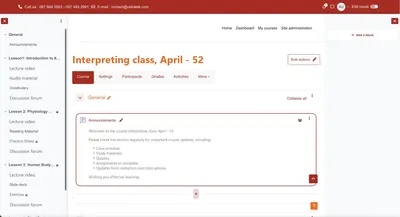
If you need to manage competency frameworks, learning plans, and completion reports, Moodle LMS is an option worth evaluating. The Moodle LMS features page and the Learning plans documentation describe the relevant capabilities; how they apply depends on your configuration and program design.
Are Moodle LMS and Moodle Workplace the same?
Not exactly. Moodle LMS is a learning management platform with core tools for courses, assessment, progress tracking, competency frameworks, and learning plans. Moodle Workplace is a product aimed at organizational training, adding capabilities designed for business environments. So when reviewing a demo or quote, ask the implementation partner to specify which features belong to Moodle LMS, which belong to Workplace, and which are custom work.
For example, Moodle positions Workplace for scenarios such as onboarding, compliance training, and reporting by organizational structure. See Moodle Workplace details. Choose based on the process you need to solve, the scale of use, and your operational capacity, rather than assuming the more feature-rich edition is the better fit.
How do you roll out an internal LMS, starting small?
- Pick a priority problem: for example, onboarding takes too long, or you can't tell who has completed mandatory training.
- Define a pilot group: one department, one role, and one manager responsible for feedback.
- Write verifiable learning objectives: after the course, what task should employees be able to do, and to what standard?
- Prepare content and data: review existing materials, remove outdated versions, and finalize the employee list and access rights.
- Configure, test, and support: test assignments, learning on real devices, assessments, reports, and the support channel for when problems occur.
- Measure, then scale: compare learning progress and job results against the baseline; fix content or processes before rolling out more widely.
A small pilot shows clearly which parts need technology, which need direct management, and which need changes to training materials.
What mistakes keep an LMS from improving people management?
- Digitizing documents without goals: lots of files get uploaded, but employees don't know what to learn to do their jobs well.
- Assigning the same content to everyone: long, irrelevant courses increase dropout rates.
- Looking only at completion reports: employees can finish lessons without being able to apply what they learned.
- No content owner: processes change, but lessons, quizzes, and policies remain outdated.
- Lack of involvement from line managers: employees get no time to learn, no feedback, and no chance to practice after the course.
Every course should have an owner, a review date, expected outcomes, and a way to assess application on the job. If the goal is competency management, the LMS needs to be part of the people development process, not a standalone video library.
Frequently asked questions about internal training systems
Do small businesses need an internal training system?
They may, when materials are scattered, the same content has to be explained over and over, or new hires' progress can't be tracked. Start with a short learning path and weigh the benefits against the operational effort.
Does an LMS replace HR management software?
No. An LMS manages learning activities; an HRM handles employee records and HR processes within the scope of each product. The two systems can be connected once the data and its purpose are defined.
Does completing a course prove an employee is proficient?
Not on its own. You also need appropriate assessments, on-the-job practice, and confirmation from the manager.
How long does it take to implement an LMS?
It depends on the number of employee groups, the quality of learning materials, integration requirements, and the level of customization. Lock in the pilot scope and acceptance criteria before estimating the timeline.
How does Vidratek help businesses implement internal training?
Vidratek helps schools, training centers, and businesses implement Moodle LMS to manage courses, learners, assessments, and reporting in one centralized system. For workforce training, the starting point is clarifying which roles need training, which competencies must be achieved, what reports managers need, and which data must connect with existing systems. Learn about Vidratek's LMS services.
From the agreed scope, Vidratek can work with your business to design the course structure, configure the system, evaluate integration options, and prepare for operations after launch. Looking to standardize onboarding or track training by role? Send Vidratek your headcount, current process, and the first problem you want to solve to receive a tailored implementation proposal. Contact Vidratek.
Back to all posts