
Automated reporting is a workflow where an AI Agent pulls data from your systems, standardizes it, checks it, analyzes it and builds reports on a schedule, replacing the 8 manual steps that staff usually repeat every week. The problem isn't Excel. It's that the process depends too heavily on people to extract, consolidate, standardize and verify data.
What steps does manual reporting involve?
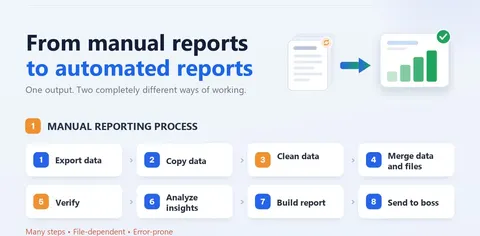
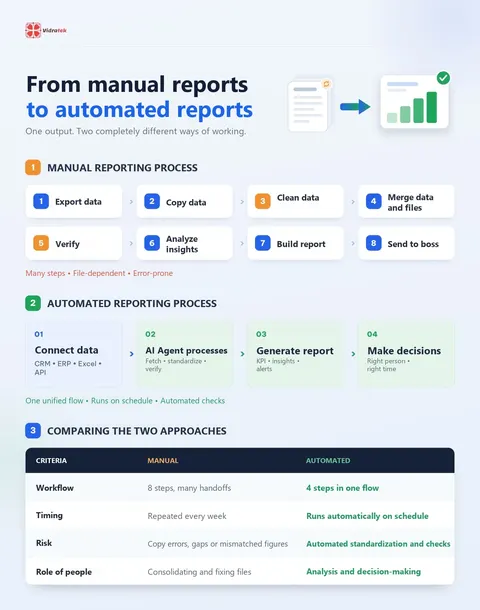
A summary report looks simple, but to produce it the report owner usually goes through 8 manual steps:
- Export data.
- Copy data.
- Clean data.
- Merge data and files.
- Verify the data.
- Analyze insights.
- Build the report or dashboard.
- Send it to leadership.
This process involves many manual actions, depends on files and is prone to errors.
What risks does manual reporting create?
Each step may take only a little time. But added up and repeated every week, the report owner loses hours to hands-on work and also faces:
- Copying the wrong data or missing data.
- Format mismatches between sources.
- Finding errors and having to go back and fix files.
- Reports reaching decision-makers later.
- Less time for the part that creates real value: analysis and action.
Is the problem Excel or the process?
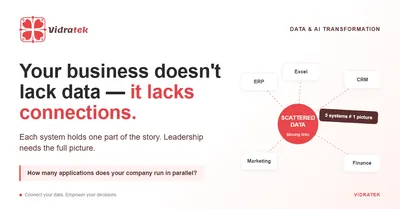
The problem isn't Excel. It's that the process depends too heavily on people to extract, consolidate, standardize and verify data. When these steps are done by hand, every repetition is another chance for errors. It is also a symptom of data scattered across systems that aren't connected. Read more in Enterprise data integration: you don't lack data, you lack connections.
How does automated reporting with an AI Agent work?
With an AI Agent, the workflow can be redesigned into 4 steps in one flow:
- Connect data: pull data from CRM, ERP, Excel and APIs.
- AI Agent processes: fetch, standardize and verify the data.
- Generate the report: compute KPIs, surface insights and raise alerts.
- Make decisions: the report reaches the right person at the right time.
This flow is unified, runs on a schedule and includes automated checks. Staff are freed up to focus on analysis and decisions instead of copy-pasting.
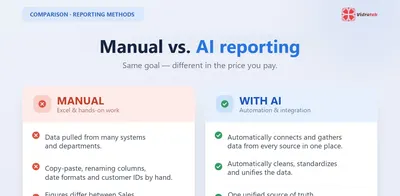
Manual vs automated reporting compared
| Criteria | Manual | Automated |
|---|---|---|
| Workflow | 8 steps, many handoffs | 4 steps in one flow |
| Timing | Repeated every week | Runs automatically on schedule |
| Risk | Copy errors, gaps or mismatched figures | Automated standardization and checks |
| Role of people | Consolidating and fixing files | Analysis and decision-making |
Where should a business start with automated reporting?
Pick the report you repeat every week that takes the most manual work. List its data sources (CRM, ERP, Excel, APIs), write down every step you do by hand and decide which can be automated first, for example fetching and standardizing data. Once the first report runs reliably, expand to the others.
Frequently asked questions about automated reporting
What is automated reporting?
A workflow where a system or AI Agent pulls data, standardizes it, checks it, analyzes it and builds reports on a schedule, instead of doing each step by hand.
Why is manual reporting error-prone?
Because the report owner has to export, copy, merge and reconcile data from several sources by hand, which makes it easy to copy the wrong data, miss data or hit format mismatches.
What does an AI Agent do in the reporting process?
It pulls data from your systems, standardizes it, checks it, analyzes it and builds recurring reports, including KPIs, insights and alerts.
Do we have to drop Excel to automate reporting?
No. The problem isn't Excel but a process that depends on manual work. Excel can still be one of the data sources connected to the automated flow.
What can staff do with the time automated reporting frees up?
They can spend it on the part that creates real value, analysis and decision-making, instead of copy-pasting data.