
An LMS (Learning Management System) is a system for managing learning that helps businesses organize courses, deliver content to the right people, and assess and track training progress. Businesses should consider an internal LMS when role-based learning paths, HR data, reporting and integrations need to be tailored to the way they operate. Such a system can be built on Moodle LMS; there is no need to write all the software from scratch.
However, more control also means someone must be accountable for learning content, security, upgrades and support. If needs are simple and the team needs to start quickly, a ready-made service platform may be a better fit. This article explains what an LMS is, what “internal” really means and how to choose an option based on total cost and value in use.
What is an LMS, and how is it different from an online document repository?
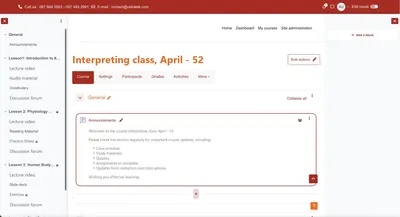
A file repository answers the question “where is the document?”. An LMS also helps answer “who needs to learn, how far have they gotten, what are the results and who needs support?”. In an LMS, an organization can create courses, add readings or videos, assign work, run quizzes, set completion conditions and view reports.
For example, when a new employee joins, the training team can assign a role-based onboarding path. The employee learns product knowledge and processes; the team lead reviews the results and then signs off on practical work on the job. A course completion mark only reflects the learning conditions that were set; it does not by itself prove the employee is proficient at the job.
Moodle LMS is an example of a learning management system with courses, assessment activities, a gradebook and reports. See Moodle LMS features. For a more detailed definition and usage, see Vidratek's article What is Moodle LMS?
Does an “internal LMS” mean building software from scratch?
No. In this article, an internal LMS is a learning environment designed and governed around one business's needs: who owns the learning content, who decides access, where the data lives, what the system connects to and who is responsible for operations. A business can self-host, hire a provider to support operations or use a managed hosting option with an appropriate level of customization.
Moodle LMS is open source: businesses can download the software, configure it, extend it and choose how to deploy it. Moodle explains the customization rights of an open-source platform. Using open source doesn't free you from all dependencies: a business still needs infrastructure, updates, administrators and possibly a service provider.
The real decision is the level of control that matches your operational capacity, not whether the server sits in the office.
Why do businesses want to control their own LMS?
- Training that follows your processes: learning paths can be tied to roles, departments and completion criteria the business has agreed on, instead of bending processes to fit a template.
- Managing learning content and history: the people in charge decide which materials are approved, when they are updated and who can see learning results. The hosting option and access rights must be specifically designed to make this happen.
- Connecting existing systems: you can assess connecting the LMS with HRM, CRM or ERP to reduce duplicate data entry and feed learning results into the right reports. Each connection must be tested; it doesn't appear automatically when you install an LMS.
- Phased growth: start with one process such as onboarding, then add courses, reports or integrations as needs become clear.
- Freedom to choose an operations partner: with open-source software, the choice of platform can be separated from the choice of support provider. Switching providers still requires a data plan, contracts and technical handover.
These are potential benefits of control and customizability; they only materialize when the business has clear processes and accountable people.
When is a third-party LMS platform still the right choice?
A ready-made LMS service is often worth choosing when a business needs to deploy quickly, has few learners, has fairly standard processes and doesn't yet have a technical team to run it. The provider can handle infrastructure, updates and part of the support; the business focuses on building content and guiding learners.
In return, check the limits on users, storage, customization rights, data export and the level of support in the plan. For example, MoodleCloud is a managed hosting service with plans that limit users and storage; some configurations or plugins can't be installed as freely as on self-hosted Moodle. See the ways to deploy Moodle.
Service platforms are not inherently less secure or less effective; nor is an internal LMS automatically cheaper. Choose based on real requirements and the responsibilities the business is willing to take on.
Which LMS deployment options should a business compare?
- Ready-made service: subscribe to a platform plan and quickly use the features and limits the provider publishes. Suited to testing standard needs with little in-house technical work.
- Self-hosted Moodle LMS: the business or a contracted team manages infrastructure, configuration and updates. Suited to cases needing deep customization rights with the resources to operate it.
- Custom Moodle LMS deployment with support services: the business defines processes, data and acceptance criteria; the implementation partner supports configuration, integration, hosting or operations under contract. The scope of control and responsibility must be spelled out.
Moodle describes the options as self-hosting, MoodleCloud and services from partners or providers. See the hosting options overview. If Moodle Workplace is recommended to you, ask specifically about licensing and the features that differ from standard Moodle LMS. See Moodle Workplace information.
Which use cases suit an internal LMS?
- Role-based onboarding: new hires learn the relevant processes, products and tools, then have their practical work assessed by a manager.
- Mandatory training: define the groups that must complete it, deadlines, completion conditions and who needs reminders or support.
- Competency development: build paths for employees transferring departments or preparing for management roles.
- Product training across many locations: use one set of approved materials while tracking progress by region or team.
- Partner training: grant access by partner organization and record the results the partnership program requires.
You don't need to put every form of training into the LMS. On-the-spot coaching, job observation and conversations with managers are still necessary; the LMS helps organize the learning and the relevant evidence. Our article on internal training systems for people management explores how to view results in more depth.
How do you compare the cost of an internal LMS vs. a service platform?
Compare over the same period, say three years, and the same number of learners. For each option, add up setup costs + recurring fees + learning content + integration + operations + expected expansion. Add assumptions about active users, video storage, support, upgrades and data export needs when switching systems.
Open-source Moodle LMS has no software license fees, but self-hosting requires servers and technical expertise; hosting or support services cost money. A SaaS option may involve less setup work, but higher plans or customization needs can drive costs up. No model is always cheaper for every business.
To avoid comparing quotes with different scopes, ask providers to price the same scenario and acceptance criteria. Our article on controlling LMS implementation costs includes a template of items to budget for.
Data and security: control comes with responsibility
Before choosing where to host, identify what data the LMS will hold: learner profiles, submissions, grades, completion history and partner information. Who can see each type of data? Who creates accounts, revokes access when employees leave, runs backups and tests restores? These answers matter more than the label “internal” or “cloud”.
If you self-host, the business or the operations provider must manage updates, permissions, backups and incidents. If you use a service, check the terms on storage location, data access, support, data export and responsibilities when the contract ends. Open source lets you choose where the software runs, but it doesn't by itself guarantee the system is securely configured. See Moodle's explanation of data control.
Five questions to ask before building an internal LMS
- What recurring training problem needs solving? If you only have a few documents and no one in charge, start with the process rather than the software.
- Which processes must be customized? Are role-based assignment, assessment, reporting or HRM integration truly mandatory requirements in the first phase?
- How much control over data do you need? Define viewing rights, storage location, retention period and how data is exported.
- Who will run it after launch day? You need owners for learning content, account administration, incident handling and reviewing results.
- What is the total cost over several years? Include service fees, infrastructure, integration, training, upgrades and your internal team's time.
If the answers lean toward custom processes and long-term integration, evaluate an LMS controlled by the business. If needs are still small and standard, try a ready-made service and expand once you have usage data.
How to start building an internal LMS without scaling too early
- Pick one learner group and one outcome to achieve, e.g., new sales staff understand the product and pass a consultation practice exercise.
- Prepare two or three short courses from approved materials; assign someone to keep the content updated.
- Write minimum requirements: groups and permissions, how courses are assigned, assessments, completion conditions and manager reports.
- Pilot on a suitable deployment option; test the devices learners actually use and how support works when something goes wrong.
- Set a baseline before the pilot, then measure learning progress alongside job results; adjust before expanding to more departments or integrating more systems.
If you need to connect HRM, CRM or ERP, describe one specific data flow first. Our article Can Moodle integrate with CRM, ERP and HRM? covers the cases that need testing.
Internal LMS FAQ
Does building an internal LMS mean programming a new platform?
No. A business can configure and extend a system like Moodle LMS to fit its needs, then choose to run it in-house or hire support.
Is an internal LMS always more secure than a SaaS platform?
No. Security depends on the configuration, permissions, updates, backups and data management of each option.
Does a small business need its own LMS?
Only when recurring training needs, data or custom processes are clear enough to justify the operational effort. Pilot one course before making a large investment.
Is Moodle LMS completely free?
The open-source software has no license fees, but deployment and operations have costs. MoodleCloud and Moodle Workplace also have their own service or licensing models.
Vidratek helps businesses build an LMS that fits their processes
Vidratek helps businesses implement Moodle LMS to manage courses, learners, assessments and reporting in one centralized system. The work starts with identifying learner groups, training goals, data requirements and operational resources; only then do we choose the appropriate configuration, customization scope and integration approach. Learn about Vidratek's LMS services.
Weighing a ready-made platform against building an internal LMS? Share your training scale, one process that needs improvement and the limitations of your current tools. Vidratek can work with you to design a pilot scope and compare options before you make a large investment. Contact Vidratek.
Back to all posts