
Moodle LMS is an open-source learning management system that helps organizations create courses, deliver content to learners, run assessments and track progress on one platform. For businesses, Moodle can be used to standardize new-hire training, keep product knowledge up to date, deliver role-based training and record learning outcomes.
Moodle's appeal lies in the ability to adapt course structure, look and feel, and connections with other tools to your needs. But open-source software doesn't mean a ready-to-use system with no costs: a business still has to prepare learning content, infrastructure or hosting, administrators and support processes. This article explains how Moodle LMS works, where its strengths lie, when it is a good fit and how to start a rollout with measurable results.
What is Moodle LMS, and how is it different from a document repository?
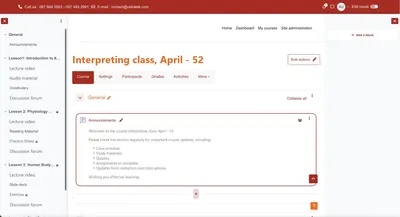
LMS stands for Learning Management System. Moodle LMS does more than store videos or PDF files. It organizes learners into courses, provides activities such as readings, forums, assignments and quizzes, records grades or completion conditions, and provides reports so the people in charge can track progress. Moodle's documentation on core features describes these groups of functions.
For example, a document folder might hold a sales guide. In Moodle, a business can turn that guide into a course with ordered lessons, quiz questions, completion milestones and progress that managers can view. That way, the question is no longer just “have we sent the document?” but “what have employees learned, what are they missing and can they apply it to their work?”. That last question still requires real-world observation and manager assessment.
How does Moodle LMS work in a business?
A typical process has four roles: the administrator configures the system and permissions; the training lead builds courses; employees take courses and complete assignments; line managers review progress, give feedback or sign off on practical work. In a small business, one person may hold several roles.
- Create learner groups: by position, department or hiring cohort.
- Build courses: put learning materials, assignments, questions and completion conditions in the right order.
- Assign and support learning: communicate goals, deadlines, who is in charge and how to ask for help.
- Assess: review submissions, quiz scores and on-the-job practical work.
- Improve: review which lessons are hard to understand, who hasn't completed and which content is outdated.
Moodle provides the tools; the business decides on competency goals, content quality and how to use the results to support employees.
What are the benefits of Moodle LMS for businesses?
- Customizable to your processes: organizations can arrange courses, roles, the interface and plugins to match how they operate. The level of customization depends on the hosting option and technical capability.
- Supports many ways of learning: Moodle supports self-paced content, assignments, quizzes, discussion activities and blended learning; businesses don't have to turn every topic into a long video.
- Progress tracking: you can set activity or course completion conditions and use the gradebook and reports to see where learners stand. See Moodle's progress tracking documentation.
- Support for standards and external tools: Moodle has activities for SCORM packages and tools via LTI; integration with HRM or other systems requires separate assessment and testing. See supported activity types.
- Control over the deployment option: businesses can self-host or choose a hosting and support service that fits their resources. See the ways to use Moodle.
These benefits pay off when training goals are clear and someone is accountable for operations. Simply installing Moodle does not create an effective training program.
What can businesses use Moodle LMS for?
- Onboarding: assign role-based onboarding paths covering processes, products, tools and foundational quizzes.
- Product knowledge training: keep materials up to date for sales, customer service and partners; check understanding when products change.
- Mandatory process training: define who must complete it, deadlines, completion criteria and reports on cases that need support. If you need recurring certification or complex automation, the specific product and configuration must be checked.
- Role-based development: build programs for employees moving up to team lead or transferring departments, combining online learning with on-the-job coaching.
- Multi-location training: use the same course structure and approved materials while tracking each group's progress.
For example, a business with many retail locations can launch a course on a new consultation process. Employees study the material and take a short quiz; store managers then observe real consultations. Moodle helps record the learning, while conclusions about job competency require evidence from the workplace.
Which Moodle LMS features should you know before deployment?
For businesses, the five feature groups that usually need checking first are learner and access management, course creation, assessment, completion tracking and reporting. Only then should you consider competency-based paths, mobile learning, account integration or automation.
Moodle LMS has tools for course creation, enrollment management, the gradebook, reports and Learning plans. Some advanced business workflows belong to Moodle Workplace or require extensions and custom configuration. See Moodle LMS features. To turn a feature list into pilot criteria, see our article on the key features an internal LMS needs.
How do Moodle LMS and Moodle Workplace differ?
Moodle LMS is open-source software with core functions for creating, organizing and tracking courses. Moodle Workplace is a licensed product built on Moodle LMS that adds capabilities geared toward organizational training. Moodle positions Workplace for needs such as programs based on organizational structure, automation and compliance training management. See official information about Moodle Workplace.
So don't assume every feature shown in a Workplace demo is available in standard Moodle LMS. Before choosing, ask for clarity on the edition, which features are available out of the box, which need configuration or additional development, the licensing model and ongoing costs.
What are the ways a business can deploy Moodle?
There are three common approaches: self-hosting Moodle LMS, using MoodleCloud as a ready-made hosting service, or working with a provider of implementation and hosting services. According to Moodle's guidance, each approach differs in level of control, customizability and the technical work the organization has to take on.
- Self-hosting: flexible configuration and integration, but requires someone responsible for servers, security, backups, upgrades and support.
- MoodleCloud: lets you start quickly with a managed service; check the user limits, storage and ability to install plugins on each plan.
- Implementation services: a good fit when the organization wants requirements analysis, configuration, customization, integration and support within an agreed scope.
Choose based on the number of learners, the data you need to connect, the level of customization, budget and your operational capacity after launch.
Is Moodle LMS free? What are the real costs?
You can download and use the open-source Moodle LMS software without paying software license fees. However, a business project typically involves costs for infrastructure or a hosting plan, learning content design, configuration, theming, integration, administrator training, backups, security, upgrades and user support. See Moodle's explanation of open source.
For example, a small team piloting an onboarding course can start with a tight scope. A business that needs HRM sync, multi-level permissions and reporting by business unit will spend more effort on analysis and testing. So compare the total cost of ownership for the same scale and period of use, rather than just asking whether the software is free.
How do you start using Moodle LMS in your business?
- Pick one priority problem: for example, new hires take too long to learn processes, or mandatory training isn't being tracked.
- Define the expected outcome: after the course, what should employees be able to do, and who confirms it?
- Choose a pilot group: one role, one responsible manager and enough learners to surface real issues.
- Prepare materials: review the correct sources, remove old versions, break content into short pieces and create suitable assessments.
- Configure Moodle: set up groups, permissions, courses, completion conditions, reports and learner support.
- Measure, then adjust: review progress, quiz results, feedback and on-the-job application before scaling up.
Don't start by uploading all your old materials to the system. A pilot course with a clear goal will help determine what needs customization and what can be used right away.
How do you measure the effectiveness of Moodle LMS in a business?
Track two layers of data. In Moodle: start rates, on-time completion, assessment results and the content that many people struggle with. On the job: time for employees to perform the target task, quality of execution and manager feedback.
Set a baseline before rollout, then compare it with the pilot period. If completion rates are high but on-the-job errors don't decrease, revisit the learning goals, practice scenarios and how managers coach employees. Completion data tells you learning took place under the conditions you set; it does not by itself prove competency or business impact.
Moodle offers ways to track grades, activities and course completion, but reports are only useful when completion conditions and data viewing permissions are configured correctly. See the progress tracking documentation.
Moodle LMS FAQ
Is Moodle LMS suitable for small businesses?
It can be, if the business has recurring training needs and someone responsible for content. Start with a short course, then consider a hosting and operating option that fits your scale.
Can Moodle be used for live teaching?
You can use online classroom tools such as BigBlueButton within Moodle. Quality and cost depend on the meeting service, configuration and class size.
Does Moodle LMS replace HR software?
No. Moodle manages learning activities; HR software manages records and HR processes within the scope of each system. Integration options can be evaluated once you identify the data that needs to be synced.
Does Moodle support SCORM?
Yes. Moodle has an activity for adding SCORM packages to courses; test your specific content package and how results are recorded before rollout. See Moodle's SCORM documentation.
Vidratek helps businesses implement Moodle LMS
Vidratek helps businesses, schools and training centers implement Moodle LMS to manage courses, learners, assessments and reporting on one centralized platform. For businesses, Vidratek starts from the specific training problem, the learner groups, the data to track and the systems to connect; then defines the appropriate scope of configuration, customization and operations. Learn about Vidratek's LMS services.
Considering Moodle for internal training? Share your headcount, one process you want to improve and the systems you currently use. Vidratek can work with you to design a pilot scope, a way to measure effectiveness and a plan to scale. Contact Vidratek.
Back to all posts