
Yes, Moodle can integrate with CRM, ERP, and HRM systems to exchange learner data, assign training programs by role, and feed learning results into business management processes. Moodle offers web services and multiple authentication options; however, this doesn't mean every CRM, ERP, or HRM product connects out of the box. The scope of synchronization depends on the other system's API, access rights, data quality, and how the business defines its processes.
A useful integration usually starts with specific questions: where are accounts for new employees created, how does the learning path change when someone moves departments, and who can see training results? This article explains each type of integration, what data to exchange, testing steps, and the mistakes that make projects costly without producing reliable reports.
What does integrating Moodle with CRM, ERP, and HRM mean?
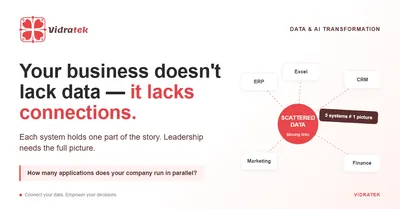
Moodle LMS manages courses, learners, assessment activities, and progress. An HRM typically holds employee records and the organizational structure. A CRM manages customers, partners, or sales opportunities. An ERP handles operational processes such as orders, products, or resources, depending on each company's configuration. Integration means moving the necessary data in the right direction between systems to reduce manual entry and support decision-making.
For example, the HRM sends employee IDs and positions to Moodle to assign the right courses; Moodle returns completion status to wherever the business compiles reports. With a CRM, a business can link partner training programs to partner records. With an ERP, results from training on a new process can be used in operational reports. These are design options, not default flows built into every system.
What integration methods does Moodle support?
- Web services/API: external systems can perform operations Moodle permits once an administrator configures the service, permissions, and access credentials. This provides a technical basis for syncing accounts, enrolling users, or retrieving learning data, depending on the functions available and the integration design. See Moodle's web services documentation.
- Authentication and login: Moodle offers options such as OAuth 2, LDAP, and external databases. Single sign-on makes it easier for users to access the system, but it does not automatically sync courses, departments, or grades. See authentication options.
- Files and scheduled processes: when needs are small or the other system lacks a suitable API, you can design controlled data import and export steps. This requires record-matching rules, error handling, and an owner.
- LTI: used to bring external learning tools into Moodle courses; LTI does not replace HR or customer data connections with an HRM or CRM. See Moodle's LTI documentation.
Choose the connection method based on the data to be exchanged, how often it changes, and the technical capabilities of both systems.
Integrating Moodle with HRM: automating the employee lifecycle
This is often the scenario with the clearest value for businesses running internal training. The HRM can be the authoritative source for employee IDs, departments, positions, and employment status. That data lets Moodle create or update accounts and assign the right learning groups; completion results can be sent back to HR or managers within the permitted scope.
Define four events up front: joining, changing roles, leaving, and returning to work. For example, when an employee moves from sales to customer service, which courses must be added, which keep their history, and who approves the change? If you only sync department names without deciding these rules, the LMS will still require a lot of manual work.
A “completed” status is not the only evidence of competency. If the data is used for performance evaluation, combine it with practical assignments and manager feedback, and restrict viewing rights to the agreed purpose.
Integrating Moodle with CRM: training customers and partners
For businesses with dealers, distributors, or customer education programs, the CRM can store organization and contact records, while Moodle manages courses and each individual's learning results. A pilot flow might create learner accounts for approved partners, assign product knowledge courses, and display training status on the partner record in the CRM.
Before implementing, decide who the learners are: partner employees, individual customers, or both? If a partner company has many learners, which identifier correctly links each individual to the organization? When a partnership ends, how is course access handled? These questions affect data, permissions, and account costs.
There's no need to push the entire learning history to the CRM. It's usually best to start with a few statuses that serve the work, such as not started, in progress, completed, and completion date. Sync detailed scores only if CRM users really need them and are authorized to see them.
Integrating Moodle with ERP: tying training to operational processes
The ERP can be a data source for business units, job positions, products, or operational processes. When a process changes, the business can use ERP data to identify which employees need to study the new materials in Moodle. Completion status can then feed operations managers' reports, provided the two systems have a suitable exchange mechanism.
For example, a business rolls out a new order-processing workflow for a warehouse team. The ERP identifies the affected group; Moodle assigns the training course and quiz; the department head confirms that employees can apply the process during their shifts. Completing the course supports the change, but it does not by itself confirm that employees are performing the steps correctly in the ERP.
Avoid connecting systems just so “each has the other's data.” Every data field transferred should be tied to an action: assigning a course, granting access, sending a learning reminder, or feeding a specific report.
What minimum data should you agree on before integrating?
Before writing any code, document the following for each data field:
- Identifier: what stable ID do employees, customers, or partners use? Email addresses can change and are not always a reliable matching key.
- Source of truth: which system is allowed to change names, departments, roles, account status, and training results?
- Direction and frequency: does data flow one way or both ways, update instantly or on a schedule, and what is the maximum acceptable delay?
- Status and rules: does “completed” mean opening every lesson, reaching a minimum score, or manager confirmation? When someone retakes a course, how is the previous status kept?
- Access and retention: who can see scores, study time, and history; how long is data kept under the organization's policy?
A clear data table enables more accurate estimates and reduces errors such as duplicate accounts, wrong course assignments, or reports that differ between Moodle and the source system.
How simple should your integration architecture be at first?
For a small process, you can start with a one-way flow: HRM → Moodle for the employee list and positions. Once account creation and course assignment have been verified, add a Moodle → HRM flow for completion status if managers need to see it there. CRM and ERP should also be approached one specific use case at a time.
If many systems need to be connected, an integration layer or automation tool can help manage data mapping, schedules, logging, and error alerts. Whatever the approach, require operations that can be safely re-run: the same record must not create duplicate accounts or results. Every failed sync must have a retry mechanism and an owner to resolve it.
Moodle provides web services that let external systems perform authorized operations; the official documentation also requires configuring the appropriate services and permissions. See how to configure web services. Don't grant site-wide admin rights to a connection that only needs to read course progress.
What security and privacy checks are needed?
Learning data can contain personal information and assessment results. So an integration should exchange only the data needed for the defined purpose, use secured connections, grant least-privilege access, and keep audit logs. API credentials must be managed securely, with an owner responsible for rotating or revoking them when needed.
Test the scenarios that are easy to miss: can departed employees still log in; can a manager in department A see department B's scores; can one partner see another partner's data; do error logs inadvertently contain sensitive data? Businesses need to check how data is stored and shared against their internal policies and the legal requirements that apply to them.
Single sign-on also needs to be tested separately against the account provisioning and deprovisioning process. Moodle supports many authentication options, including OAuth 2, but the right choice depends on the business's identity system. See Moodle's OAuth 2 documentation.
How do you pilot a Moodle integration before scaling?
- Choose one process: for example, assigning onboarding courses from the HRM to new hires and returning completion status to HR reports.
- Finalize data and responsibilities: employee ID, role, assigned courses, completion criteria, source system, and approver.
- Check connectivity: APIs, permissions, rate limits, authentication method, and test environments for both Moodle and the other system.
- Test normal and edge cases: new hires, department transfers, departures, course retakes, interrupted syncs, and re-runs after errors.
- Reconcile reports: does the same employee and course show a consistent status in both systems, and do users see the right data according to their permissions?
Expand to CRM or ERP only once the first flow runs reliably and has someone operating it. This lets the business see real benefits before investing in a complex web of integrations.
What factors drive the cost of a Moodle integration?
Cost can't be estimated accurately from the labels “CRM,” “ERP,” or “HRM” alone. The main factors are the number of data flows, API quality, how clean the legacy data is, permission rules, update frequency, the number of edge cases, and post-launch support requirements.
To get comparable quotes, send every vendor the same brief: one use case, the list of data fields, sync direction, number of users, error scenarios to handle, and acceptance criteria. Ask for separate costs for discovery, development, testing, ongoing operations, and scope changes. Our article on controlling LMS implementation costs offers a more detailed budgeting framework.
Frequently asked questions about Moodle integration
Does Moodle come with ready-made connections to every CRM, ERP, and HRM?
No. Moodle has tools and technical interfaces that support integration, but each connection must be evaluated based on the product, version, API, permissions, and data to be exchanged.
Does single sign-on mean training data is integrated?
No. Single sign-on handles authentication; assigning courses, handling department transfers, and exchanging results require separate data flows.
Can LTI be used to sync employee records?
LTI is mainly for connecting learning tools to learning platforms. Employee records and HR processes usually call for a more suitable data or API approach.
Should data be synced in real time?
Only if the process requires it. For many reports, scheduled updates may be sufficient and easier to operate; accounts, access rights, or upcoming classes may need a different speed. Decide on the acceptable delay before designing.
Vidratek helps connect Moodle with your business systems
Vidratek implements Moodle LMS and helps businesses design system integrations around their actual processes. For CRM, ERP, or HRM needs, the first step is to identify the source system, the data that truly needs to move, access rights, and the results users want to see. Only then do we choose the technical approach, pilot scope, and operational support model. Learn about Vidratek's services.
Which system do you want Moodle to exchange data with? Send Vidratek the system name, one process you want to connect, and an example of the report you want. Vidratek can review the integration feasibility with you and propose a suitable pilot. Contact Vidratek.
Back to all posts