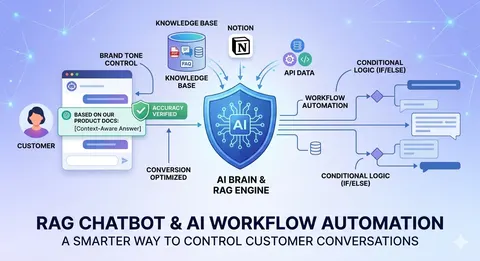
A RAG chatbot combined with AI workflow automation helps businesses control how a chatbot talks to customers. RAG lets the chatbot take its answers from the business's own data. Workflow automation (with a tool such as n8n) decides what the chatbot does next: connect to other apps, branch by situation or hand over to a person.
What is a RAG chatbot?
RAG (Retrieval-Augmented Generation) is a technique where a chatbot doesn't rely only on pre-trained knowledge. A RAG chatbot retrieves relevant data from the business's own knowledge base (documents, FAQs, databases) and uses it to generate context-appropriate answers. It can answer based on:
- Internal company documents.
- Product specifications.
- Policies and procedures.
- Custom business logic.
The result is answers that are more accurate, reliable and up to date.
Why are traditional chatbots hard to control?
Most AI chatbots today generate answers from general training data, can't guarantee factual accuracy, lack control over tone and response logic, and are hard to customize for complex workflows. For a business, this means a poor customer experience, the risk of wrong information and limited scalability.
How does n8n help orchestrate AI?
n8n is a low-code workflow automation tool. Combined with RAG, your chatbot becomes an AI agent that can:
- Connect 400+ apps: sync data between the chatbot and tools such as HubSpot, Salesforce, Google Sheets or Slack.
- Use advanced logic: build complex “if/then” scenarios with n8n's visual nodes that a standard chatbot struggles to handle.
- Retrieve from multiple sources: pull data from several places, for example a PDF on Google Drive and a row in a SQL database, to answer one question.
- Keep a human in the loop: automatically notify staff by Slack or email when the AI detects a sensitive or high-priority issue.
What does Vidratek's RAG plus workflow automation solution include?
1. A smart RAG chatbot. Connect your data sources (PDFs, Notion, databases, APIs), automatically retrieve the most relevant information and generate accurate, contextual answers.
2. Custom AI workflows. Design how your AI reacts in different situations: build conditional logic (if/else), control escalation to human agents and personalize responses based on user behavior.
3. Control over AI conversations. Define the tone (formal, friendly, sales-oriented), set response boundaries, control how the AI handles sensitive questions and tune conversations toward conversion.
What value does a RAG chatbot bring to a business?
- Contextual responses: answers based on your own data, not guesswork.
- Workflow automation: design conversation flows visually, without complex coding.
- Smart knowledge retrieval: fetch relevant content from multiple data sources.
- Conversion focus: guide users toward actions such as buying, signing up or booking.
- Data safety: your data is used for its intended purpose.
What are real-world use cases for a RAG chatbot?
- E-commerce: product recommendations from catalog data, order tracking, customer support and selling through conversations.
- SaaS and tech companies: automated onboarding support, technical support from documentation, lead qualification and demo booking.
- Services and consulting: answering domain-specific questions, automating repetitive consultations and escalating complex cases to experts.
When should a business use RAG with workflow automation?
It fits when a chatbot has to answer accurately from your documents and also do other work, such as looking up orders, logging leads into a CRM or alerting staff. If you are just starting, try one group of frequent questions and expand gradually. For the underlying idea, read why AI chatbots give wrong answers and how RAG fixes it.
Frequently asked questions about RAG chatbots and AI workflow automation
How is a RAG chatbot different from an ordinary AI chatbot?
An ordinary chatbot answers from general training data. A RAG chatbot retrieves data from the business's own knowledge base before generating an answer.
What is n8n used for in a chatbot system?
n8n is a workflow automation tool. It connects the chatbot to other apps, builds “if/then” scenarios and notifies staff when needed.
Can the chatbot hand a conversation to a human?
Yes. You set rules so the chatbot either handles a conversation itself or passes it to a person, for example for sensitive or high-priority issues.
What data sources can a RAG chatbot connect to?
PDFs, Notion, databases and APIs, plus many other apps through n8n.
Can a business control the chatbot's tone?
Yes. You can set the tone, such as formal, friendly or sales-oriented, and define response boundaries.