
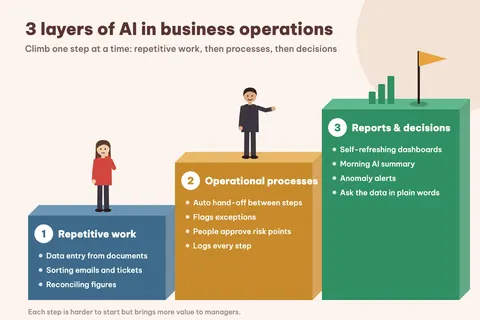
Plenty of companies already let staff use AI: one person drafts emails with it, another summarises documents. Each of them gets a bit faster, and the shared process stays exactly as it was. Data is still typed in by hand, requests still wait for someone to pass them on, and reports still get pulled together at the end of the week.
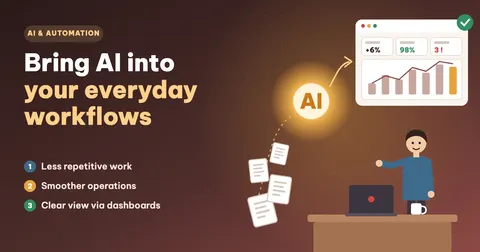
To see a real change, AI has to sit inside the steps of the work: taking over repetitive actions, moving work between teams and feeding reports and dashboards so managers see what is happening in time. Below are three layers of doing that, how to choose what to hand to AI first, and a five-step roadmap.
Why using AI ad hoc does not change much
When AI lives only in each person’s chat window, it never touches the company’s data or workflow. The most visible result is copying: staff paste content into AI, then paste the answer back into Excel or the system. The same task gets prompted a dozen different ways, so the output varies and is hard to control.
Nobody knows what the AI did either, because there is no log or approver, so mistakes are hard to trace. Worse, contracts, payroll and customer details can end up in public tools before any policy exists.
Bringing AI into a process means redesigning it: where data comes in, which step AI handles, who approves, which system stores the result and which report shows it.
AI takes on repetitive work
This is the easiest layer to start with and the quickest to pay off. Good candidates repeat daily or weekly, have inputs that look broadly the same, and follow rules you can write down.
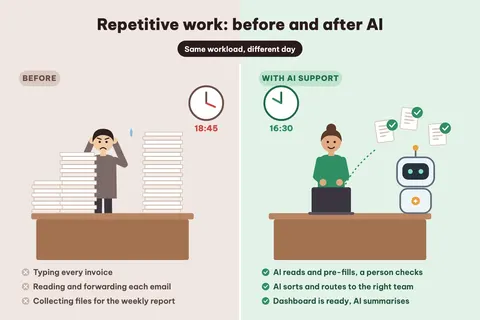
- Data entry from documents: AI reads invoices, receipts and purchase orders and pre-fills the accounting system or ERP, and staff only check.
- Sorting emails and support requests: AI reads them, tags them as complaints, quotes, returns and so on, and routes them to the right team.
- Reconciliation: matching orders with payments and bank statements with the books, and flagging only the mismatches.
- Drafting templated customer replies, meeting minutes and product descriptions for the owner to edit and send.
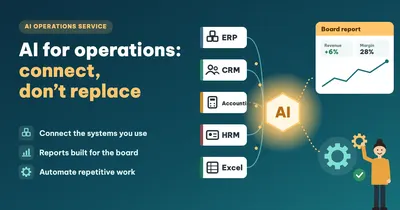
- Pulling figures for recurring reports from several sources instead of opening each file and pasting numbers.
Staff spend less time doing each step and more time checking results and handling exceptions.
AI streamlines operational processes
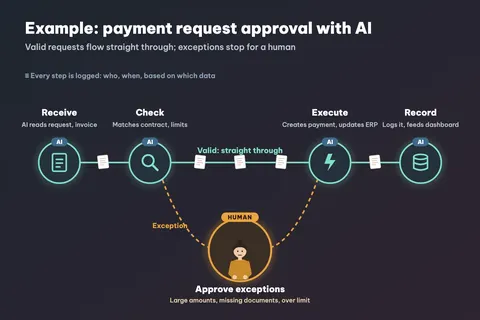
In the second layer, AI links the steps of a process. Requests stop sitting in an inbox or on someone’s desk, because each step starts as soon as the one before it finishes. Items that meet the conditions move on without anyone forwarding them, while AI checks them against limits, contracts and policies and flags anything missing, wrong or about to be late.
Risky cases such as large payments, key customers or situations with no rule go to the right approver with the reason attached. Every step records who did it, when, and from which data, which is enough for internal control and audit. Processing times per step also show where work piles up, so you know what to fix.
The figure below shows a payment request approval flow. Order handling, HR onboarding paperwork, leave approval and warranty claims can work the same way.
See where the business stands through reports and dashboards
When figures are collected by hand, the weekly report turns up halfway through the next week and the monthly one sometimes lands in the following month. By the time a manager reads it, the problem is old news.
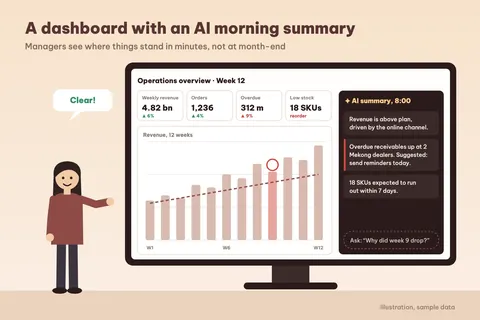
Once sales, accounting, inventory and HR data are connected, AI helps in four ways. Dashboards refresh on a schedule (hourly, daily or weekly depending on the metric) with nobody collecting files. Each morning, AI writes a few lines on what changed, where things went up or down and what needs action today. When one channel’s revenue drops suddenly, overdue receivables climb, stock runs low or costs pass the plan, the system says so straight away. And managers can ask in plain words, for example "Why did revenue drop in week 9?", and get an answer with the source figures.
A dashboard is only useful when it is tied to a decision. See also: A pretty dashboard isn’t enough and Not all data needs to be real-time.
| Area | Manual | AI in the workflow |
|---|---|---|
| Data entry | Typed by hand, error-prone, depends on the person | AI pre-fills, a person checks |
| Moving work between steps | Waiting on emails and reminders | Moves on automatically when conditions are met |
| Catching errors | Often late, at period-end reconciliation | Flagged as soon as the item enters the system |
| Reporting to managers | Files collected, ready at week- or month-end | Dashboards refresh on schedule, with summaries |
| Traceability | Scattered across emails and files | Step-by-step log in the system |
| Employee role | Doing every step | Checking, handling exceptions, improving the process |
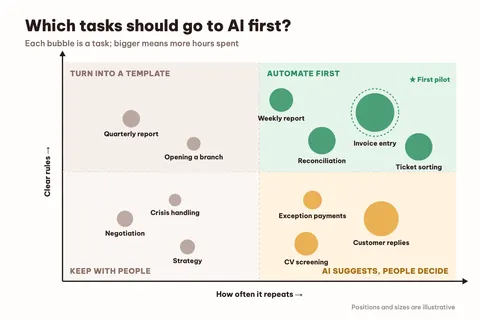
Which tasks should go to AI first?
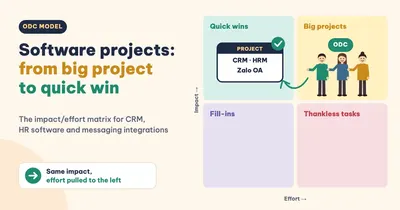
Not every task should be automated straight away. One way to choose is to sort tasks by two things: how often they repeat, and how clear the rules are.
- Frequent with clear rules: automate these first. Results come quickly and the risk is low.
- Frequent but needing judgment: AI drafts or suggests, and a person approves before anything is sent or done.
- Rare with clear rules: a template or checklist is enough for now.
- Rare and needing judgment: leave these with people; AI can help look things up.
When you list tasks, note how long each one takes and how many people touch it. The task in the first group that eats the most hours is a good candidate for your first pilot.
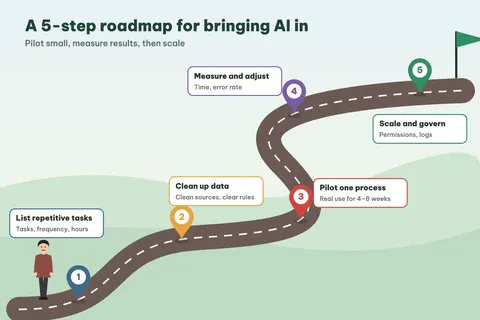
A 5-step roadmap for bringing AI into your workflows
- Each team lists its daily and weekly tasks, how long they take, who does them and where errors happen.
- Clean up data and process: find out whether the data lives in the ERP, CRM, HRM, Excel or email, and write down the handling rules and approval points. AI cannot follow a process nobody has described.
- Pick one task from the priority group and run it for real for 4 to 8 weeks with a small group of users.
- Compare before and after on handling time, error rate, share of items sent to an approver and time to report, then adjust.
- Extend to other processes, with data access permissions, action logs and a named owner for each AI flow.
Keeping AI accurate and safe
AI results are only as good as the data. If customer codes, product codes and categories differ between systems, AI will reconcile and report wrongly, so clean and connect the data first (see Enterprise data integration).
Payments, important customer replies and HR decisions should always have a person approving them. AI should read and write only the data the matching user is allowed to see. Employee and customer data must be handled under Vietnam’s Personal Data Protection Law (in force since 1 January 2026) and internal policy, and sensitive data kept out of public AI tools. Staff also need to know what the AI does, when to double-check it and where to report problems.
Learn more about Vidratek AI Agent and our data and BI consulting service, or read From manual to automated reporting and 8:00 AM: your AI agent has already processed the data.
Frequently asked questions
Should a small business bring AI into its workflows?
Yes, if it has repetitive tasks that take many hours, such as data entry, reconciliation or recurring reports. Start with one small process at a modest cost, measure the results, then expand.
Will AI replace employees?
In most cases AI replaces part of the steps, not the whole role. Staff move to checking results, handling exceptions and improving the process; risky decisions are still approved by people.
What should we prepare before starting?
A list of repetitive tasks with time spent, where the data is stored, the current handling rules and who approves. The more consistent the data, the more accurately AI works.
How is an AI dashboard different from a regular one?
A regular dashboard shows figures for people to read themselves. With AI, the system summarises what is changing, flags unusual metrics and lets you ask questions about the data in plain language.
How soon will we see results?
For a pilot process with data already available, companies can usually assess results after about 4–8 weeks of real use. Timing depends on how ready the data is and how many systems need connecting.